5 surprisingly good things Coolors can do (that most people never notice)
You know that feeling when it’s late, your screen is too bright, and you’re still nudging colors around like this one is almost right?
Yeah. That moment.
I’ll be honest with you — Coolors presents itself as a fast, intuitive palette generator. Press space. New colors. Repeat.
It works for beginners. It works for pros. Millions of people rely on it.
But here’s the thing.
That’s only the entry point.
The interesting parts show up once you stay a little longer.
1. It’s not just a generator. It’s a place you actually work in.
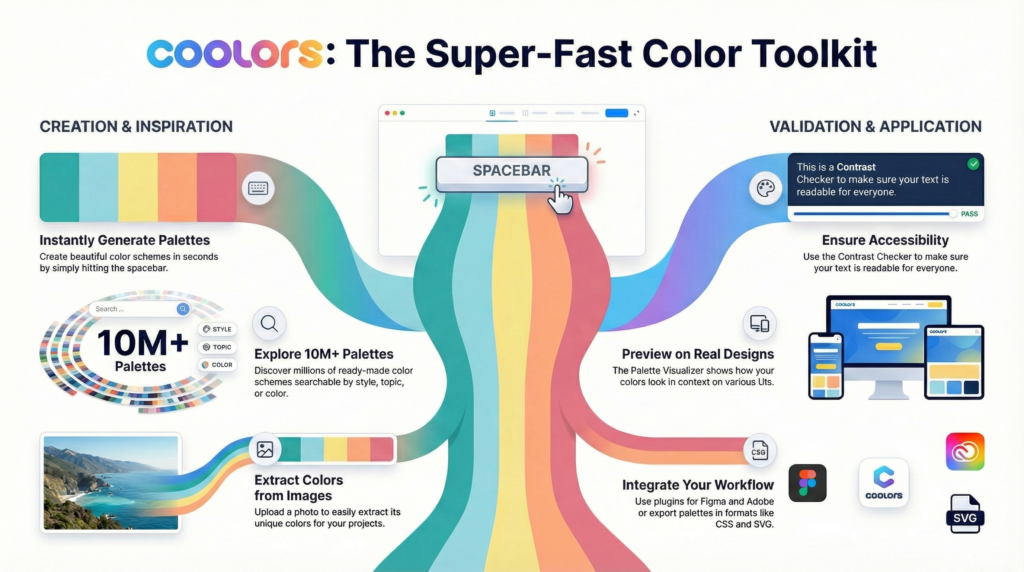
Most people stop at the spacebar. Instant palettes. Five colors. Done.
Meanwhile — and this is important — Coolors quietly turns into a full working environment.
You can extract colors from photos.
Build gradients between shades and watch them evolve.
Browse an enormous library of palettes when your brain refuses to cooperate.
Add typography into the mix — font pairing, free fonts, quick previews — and suddenly you’re not jumping between tools anymore.
It’s a bit of a mess, but in a charming way.
The kind that keeps you focused instead of overwhelmed.
2. Accessibility isn’t an afterthought here.
Circling back for a second — accessibility.
Coolors checks contrast ratios against WCAG standards right inside the tool. Text on background. Clear pass or fail.
It also lets you see how palettes appear to people with color blindness.
That part hits differently once you notice how often we forget about it.
No lectures. No drama.
Just quiet guardrails that make your work better without interrupting your flow.
3. You see colors in real layouts, not abstract squares.
Here’s where things get interesting.
Coolors lets you preview palettes on actual design mockups — websites, UI screens, branding examples, illustrations. In real time.
If you work with Tailwind CSS, there’s a dedicated visualizer that shows your palette on real components. Buttons, cards, text blocks. The stuff that actually matters.
This saves more than time.
It saves you from committing too early to something that only worked in theory.
4. The AI assistant feels… realistic.
Now, here’s the twist.
Coolors includes an AI Color Bot you can chat with. Ask questions. Describe a project. Get suggestions back.
What surprised me wasn’t the AI itself — it was the honesty around it.
They openly say it can make mistakes and that important things should be double-checked.
That small sentence changes the tone completely.
It feels lived-in. Not hype-driven. Just practical.

5. Pro isn’t about “more features.” It’s about removing friction.
I wasn’t planning to mention this, but it fits here.
The free version is fine for quick experiments. One project. A handful of palettes. Enough to sketch an idea.
Pro quietly removes the walls.
Unlimited palettes. Unlimited projects and collections.
More than five colors per palette — up to ten, which matters once you’re building real systems.
Full access to visualizers, deeper contrast checks, color variations, and clean exports you can actually send to clients with your own branding.
And yes — no ads. Dark mode. Late-night friendly.
It feels less like an upgrade and more like switching from a paint sample to an actual studio. More than million words, just try it
One last thing — this tool is made by one person.
Before I lose my train of thought, this matters.
Coolors is built by a single independent developer, Fabrizio Bianchi. He introduces himself to users. Not a company. A person.
Once you know that, supporting Pro feels different.
You’re not just unlocking limits. You’re backing someone who kept refining a tool instead of chasing noise.
Quietly brilliant. Not flashy.
Stepping back for a moment — Coolors isn’t just about colors!
It’s about reducing the tiny frictions that pile up when you’re tired, thinking visually, and trying to make something feel right.
And honestly?
It made me wonder how many tools I treat like shortcuts, never noticing how much depth is hiding just under the surface.
Not in a dramatic way.
Just… something you notice late at night, when the palette finally clicks.